

- Check that the number of positions you have to offer for your job(s) is correct. If it’s not, contact us as soon as possible.
- For each job, assign the number 1 to as many students as the number of separate positions you’re offering.
- Order remaining students by preference, by assigning them a number: Assign the number 2 to the student you most want to hire among the remaining students, a number 3 to the next best student and so on.
- The more students you assign a number to, the better your chances of a match. Note that assigning any number to a student is considered a job offer. You could end up being matched with any student that you have assigned a number, depending on their availability.
- Enter an X for students who don’t have the skills for the job.
- Our office will contact students according to your preferences and make offers according to the number of positions that you have submitted.
Ranking students
Follow these steps and guidelines to make offers to students on the COOP Navigator.
Steps

Quick Tips
- Submit your interview request immediately after the job posting deadline.
- As an employer who participates in our placement process, you must not contact students directly about any changes to the interview schedule, job offers, or rankings.
- As an employer who participates in our placement process, you must not contact students directly about any changes to the interview schedule, job offers, or rankings.

Step 1: Once in the Navigator, hover over the “Jobs” tab and select Search.
Step 2: Select the Search button again.
Step 3: Under the “Applicants” column (for the applicable round), select the number of applicants. The page will refresh with the list of applicants.
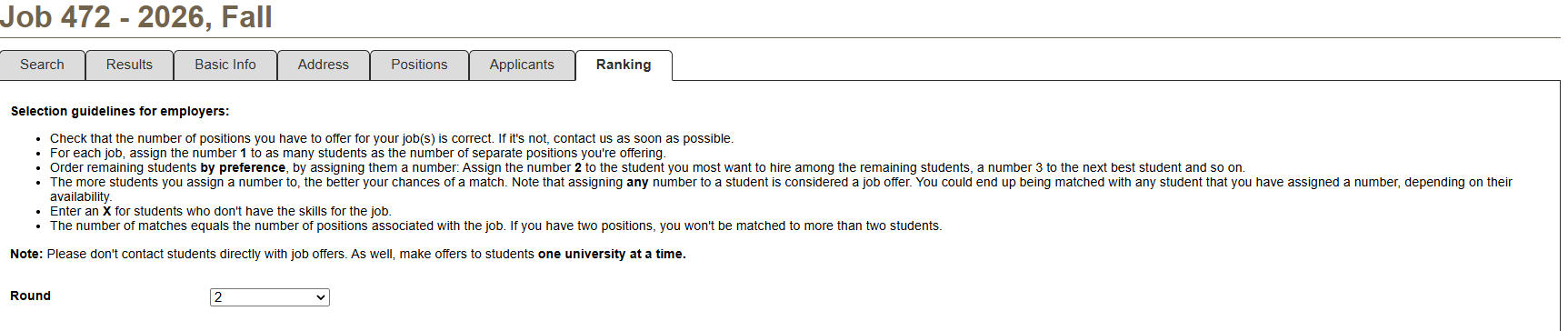
Step 4: Select the “Ranking” tab.
Step 5: For each student, select a ranking in the list under the “Employer Ranking” column (shows “Pending”) and select Save.
Selection guidelines for employers

Important
- Please don’t contact students directly with job offers.
- Make offers to students one university at a time.
- We will present your top candidate with a job offer for which they have 2 business days to accept or decline.
- The process continues until a student on your preferred candidate list accepts the offer and a match is made.
- Once a match is made, the hiring is official, and you will receive an automated confirmation email.
- Make offers to students one university at a time.
- We will present your top candidate with a job offer for which they have 2 business days to accept or decline.
- The process continues until a student on your preferred candidate list accepts the offer and a match is made.
- Once a match is made, the hiring is official, and you will receive an automated confirmation email.